Depthly
Public beta · TestFlight invites rolling out

Portrait Mode,
for every photo.

Depthly is an AI depth studio that turns any flat shot into a cinematic portrait - focus, light and lens, fully in your hands. All on-device.

Join the beta waitlist
TestFlight beta first · App Store launch July 2026 · free to start
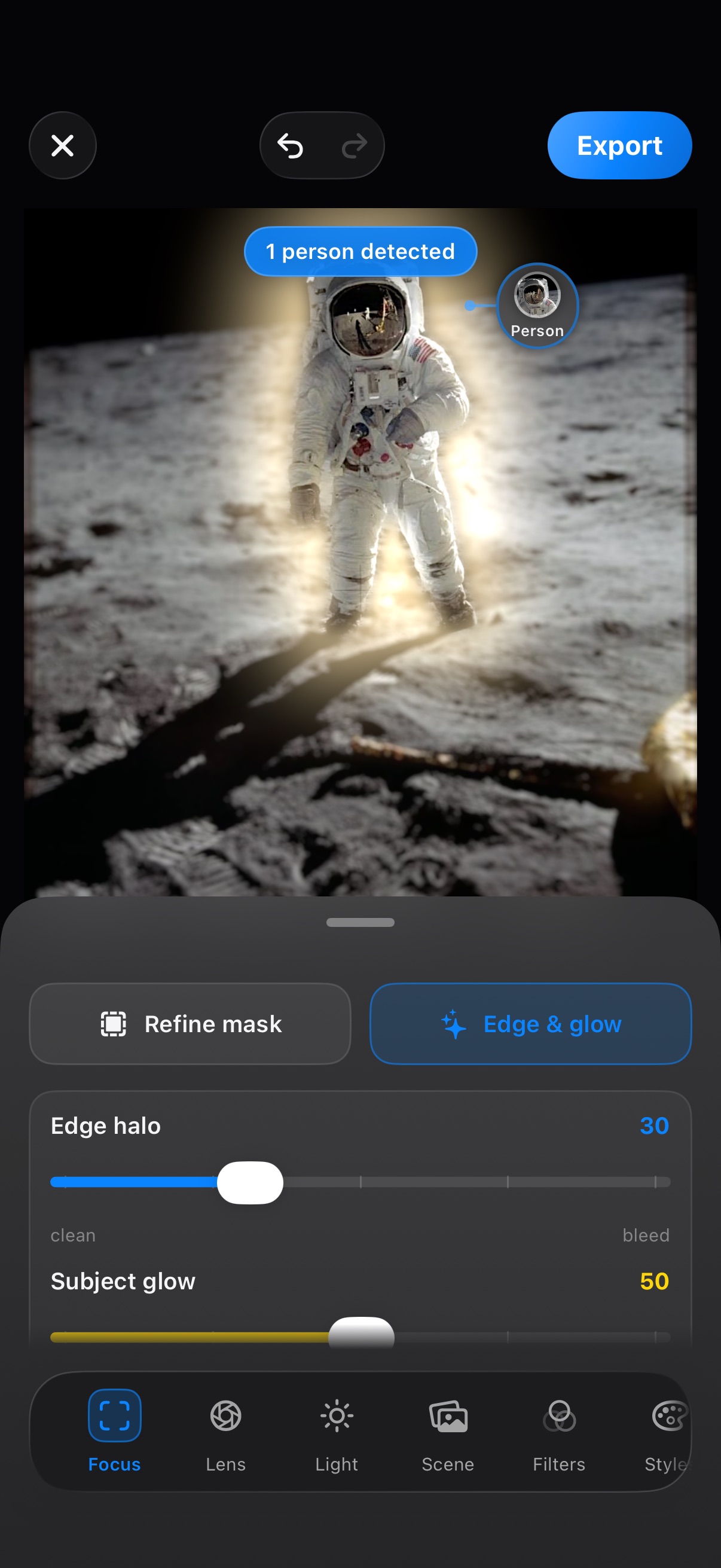
Depthly editor on iPhone: astronaut portrait with the subject glowing and the moon background blurred, person detected automatically

Before / After

Flat photo in. Cinema out.

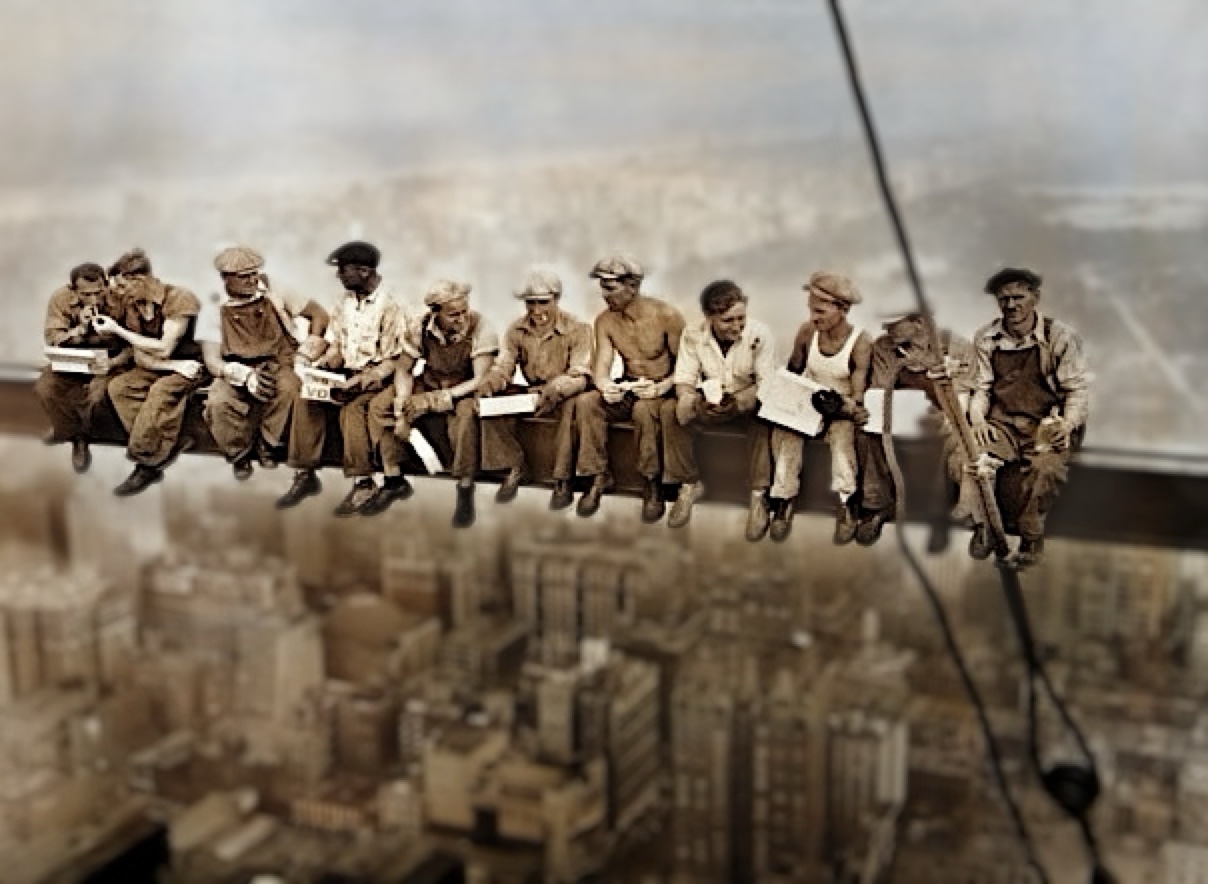
Drag the line. This is a real edit, straight out of Depthly's pipeline: the whole crew detected as individual subjects and kept tack-sharp on the beam, while an on-device depth map melts Manhattan into cinematic blur - and brings the black-and-white original back in full color.

Lunch atop a Skyscraper: the original flat photo, workers and city in even focus
The same photo after Depthly: colorized, with the whole crew tack-sharp on the beam while Manhattan melts into depth-graded blur
BEFORE
AFTER · ƒ1.4
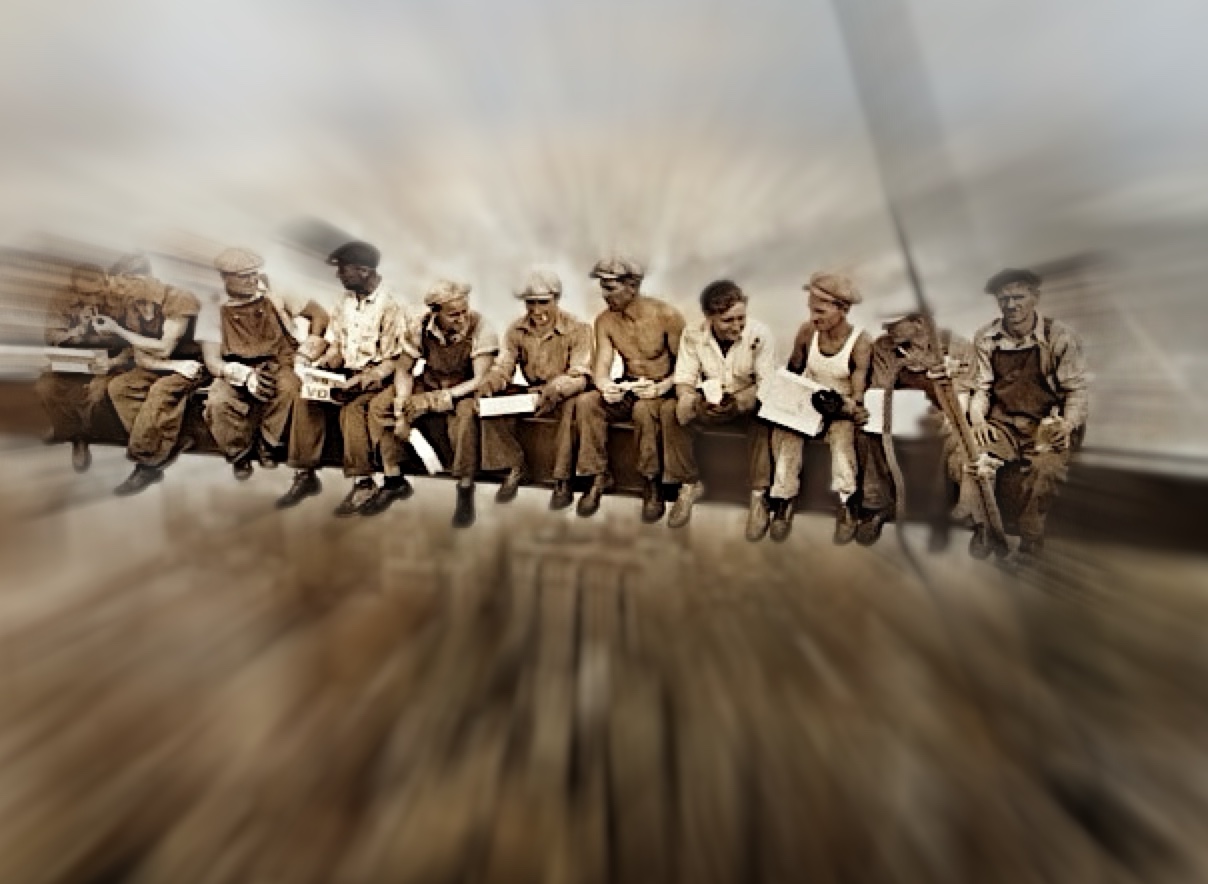
Zoom blur style: the city explodes outward while the workers stay sharp
Zoom blurBlur style
Darken treatment: the blurred city dimmed so the workers pop
DarkenEverything else
Color photo of a cat with creamy lens blur, subject sharp
Lens · your photos85mm look
100% on-device - photos never leave your phone
Works on any photo - no Portrait Mode needed
Hair-precise subject masking, editable by hand

The Studio

Focus. Lens. Light.
The three dials of cinema.

Choose who's sharp - and who melts away

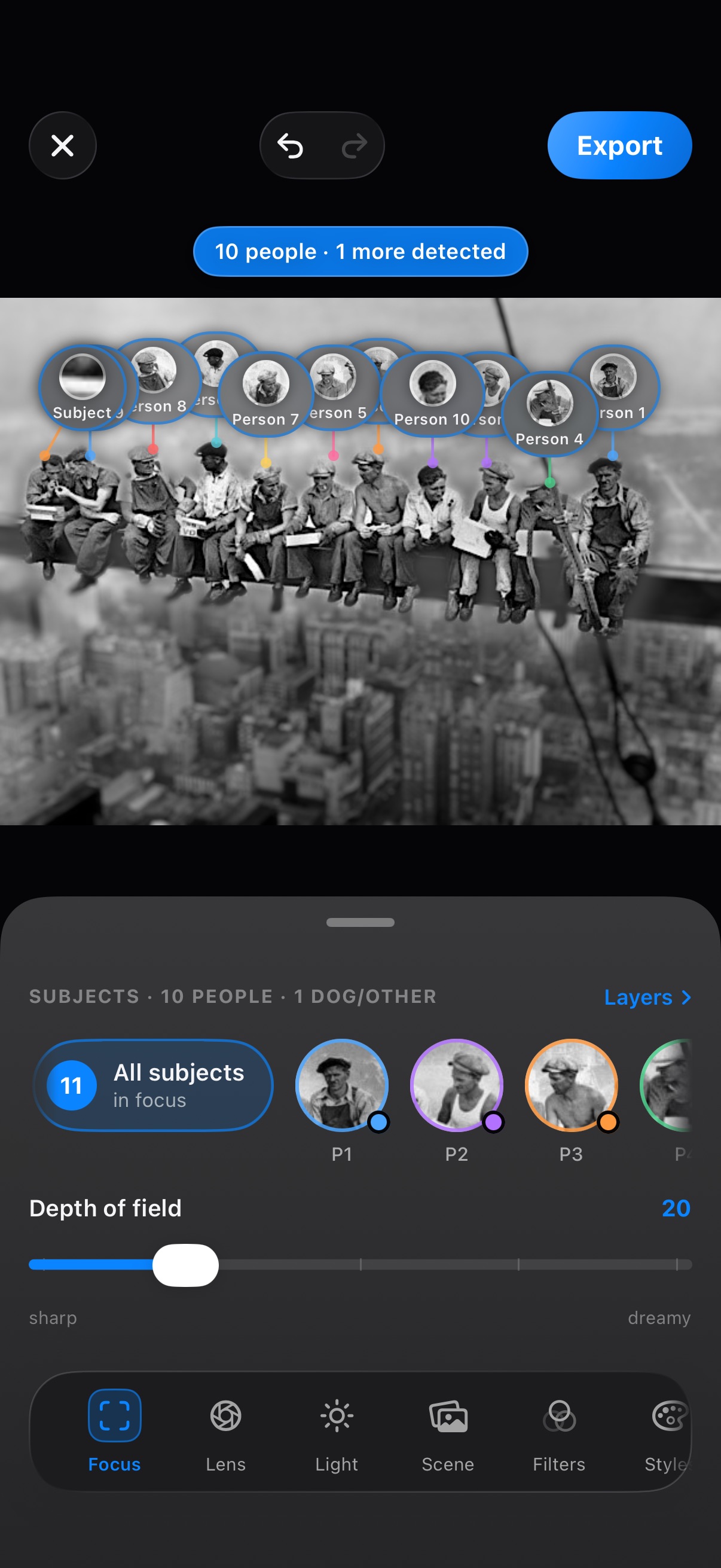
Depthly detects every person and object in the frame as its own subject. Tap a chip to keep someone tack-sharp, tap again to send them into the blur - you direct the scene, one subject at a time.

  • Detects 10+ people, pets and objects per photo
  • Tap-to-focus any subject, or all at once
  • Hand-editable masks with Smart Snap to edges
Depthly detecting 10 people as individual subjects on the Lunch atop a Skyscraper photo, each with a tappable focus chip
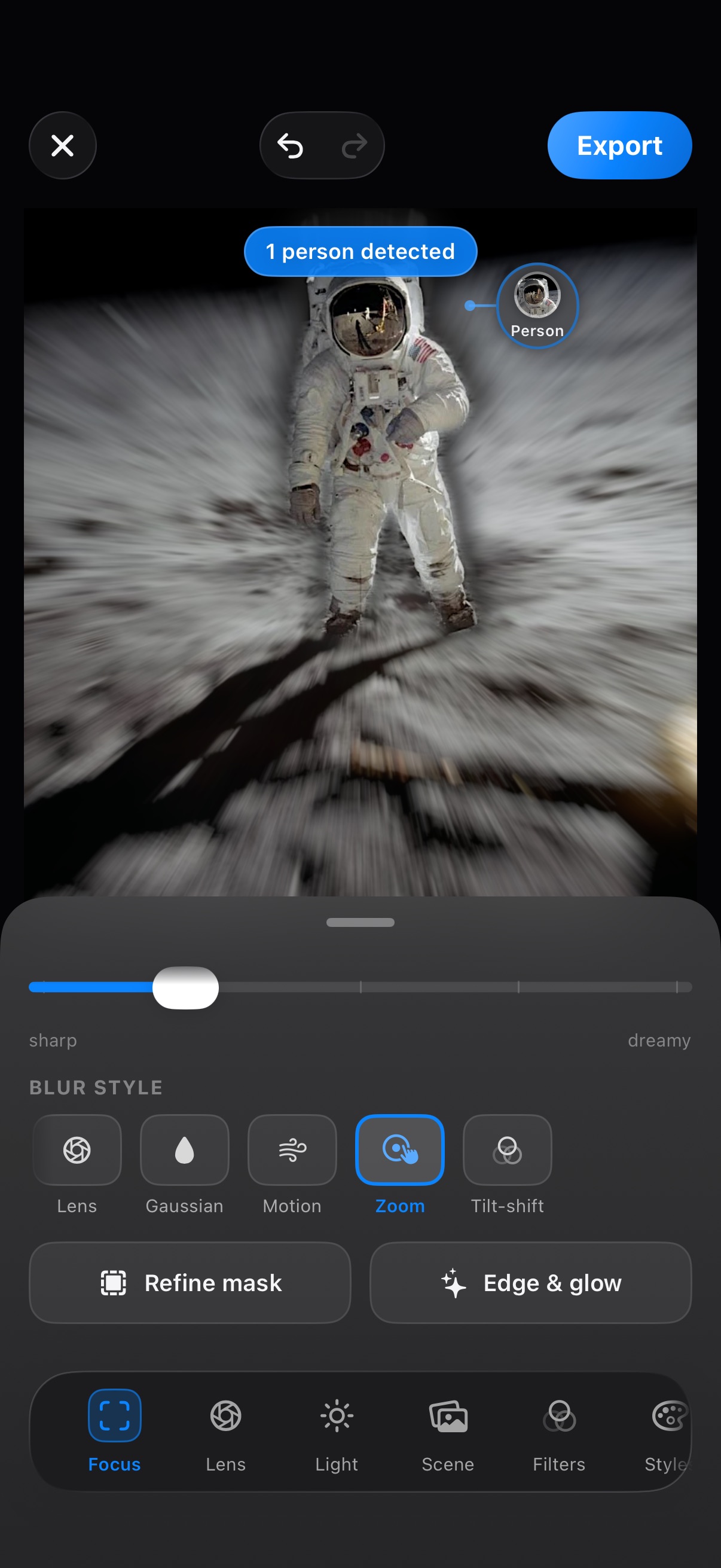
Depthly blur style picker - Lens, Gaussian, Motion, Zoom and Tilt-shift - with a dramatic zoom blur applied around an astronaut

Five blurs, one slider

Bokeh is just the beginning. Switch the character of the blur itself - creamy lens, soft gaussian, streaking motion, explosive zoom or miniature tilt-shift - and dial it from sharp to dreamy.

  • Lens · Gaussian · Motion · Zoom · Tilt-shift
  • Depth-aware - subjects stay crisp through any style
  • Edge & glow controls for a clean cutout look

Five lenses with real character

Not filters - optics. Each lens renders bokeh with its own aperture geometry: the gentle wash of a 35mm, ringed 50mm and 85mm highlights, oval anamorphic streaks, swirly petals. Highlights bloom the way glass would bloom them.

  • 35mm · 50mm · 85mm · Anamorphic · Swirl
  • Bokeh highlights dial, from smooth to ringed
  • Physically-modeled highlight bloom

Relight after the shot

Because Depthly knows the 3D shape of your subject, it can move the light. Drag a key light around your portrait, warm it up, add a rim glow - golden hour on demand, months after you pressed the shutter.

  • Draggable light with intensity & warmth dials
  • Presets: Studio, Window, Golden, Contour
  • Depth-aware shadows that wrap the face

Smart tools

More than blur.
A photo studio in your pocket.

Depth is where it starts. Tap in a model to restore, clean up or restyle any shot - the same on-device AI that brought the crew above back in color. Each tool is an optional download, so you only carry what you use.

🎨

Colorize

Bring black-and-white and faded photos back to life.

Enhance

Upscale soft or small shots and sharpen fine detail.

🩹

Restore

Heal scratches, creases and damage on old prints.

🪄

Magic Fill

Erase an object or person - the gap fills itself in.

🌾

Denoise

Wipe grain from low-light and high-ISO shots.

🌫️

Dehaze

Cut through haze and fog for clear, punchy contrast.

🧩

De-JPEG

Erase blocky compression from over-shared images.

✏️

Sketch

Turn any photo into a clean line drawing.

Every tool is an optional plugin - download what you need, delete it any time. All run on-device.

Live motion

Not just a still.
Bring the depth to life.

The depth map isn't only for blur. Export a Live clip and the camera glides through your photo in 3D - the subject floating free of the background - ready to post straight from your phone.

PARALLAX
GLIDE

Local AI. Your photos never leave your phone.

Every step - depth mapping, subject detection, masking, blur and relight - runs on Depthly's own AI models, entirely on your device. No uploads, no cloud processing, no account required. It even works in airplane mode.

100% on-device Zero data sent out Works offline

Free to start.
Cinematic from the first tap.

Depth blur and core lenses are free, forever. Go Pro when you want the whole studio.

Join the beta waitlist

FAQ

Questions, answered.

What is Depthly?

Depthly is an AI depth studio for iPhone. It builds a 3D depth map of any photo on-device, isolates your subject with a precise mask, and lets you control focus, lens character and lighting - turning flat shots into cinematic portraits.

Does it work on photos not taken in Portrait Mode?

Yes - that's the point. Depthly generates depth for any photo: old shots, screenshots, scans, photos from any camera. No Portrait Mode capture required.

Can I choose which subjects are in focus and change the blur type?

Yes. Depthly detects every person and object as an individual subject - tap to keep them sharp or send them into the blur. The blur itself comes in five styles: Lens, Gaussian, Motion, Zoom and Tilt-shift.

Is Depthly only about background blur?

No - it's a full on-device photo studio. Beyond depth blur, smart tools colorize black-and-white photos, enhance and upscale detail, restore scratched old prints, magic-fill objects out, denoise, dehaze, remove JPEG artifacts and turn photos into sketches. Each is an optional download that runs entirely on your iPhone.

Are my photos uploaded to a server?

No. Depthly runs its own local AI models - all depth mapping, subject detection, masking and rendering happens on your device, even offline. Your photos never leave your phone. Read the full privacy policy.

Is Depthly free?

Depthly is free to start - depth blur and core lenses are included. Depthly Pro unlocks the full depth plane, all five lenses, relight, scenes and watermark-free 4K export.

What can I export?

4K stills, parallax Live videos, transparent cutouts and ready-to-post platform framing - with no watermark on Pro.

When does Depthly launch?

Depthly launches on the App Store in July 2026, and a public TestFlight beta is rolling out before that. Join the waitlist for a beta invite and an early-supporter discount at launch.